Clinic operations, on one screen
Run your OPD without
Run your OPD without
waiting‑room chaos.
MyOPDApp brings medical records, queues, appointments and billing into one system — so your front desk, doctors and pharmacy stay in sync all day, every day.
600+
Clinics & OPDs running on MyOPDApp
3.2M
Patient records managed
What's inside
Everything your front desk and doctors already do — just connected.
No separate registers, no re‑typing the same patient details in three places. One system, used by every role in the clinic.
Electronic Medical Records
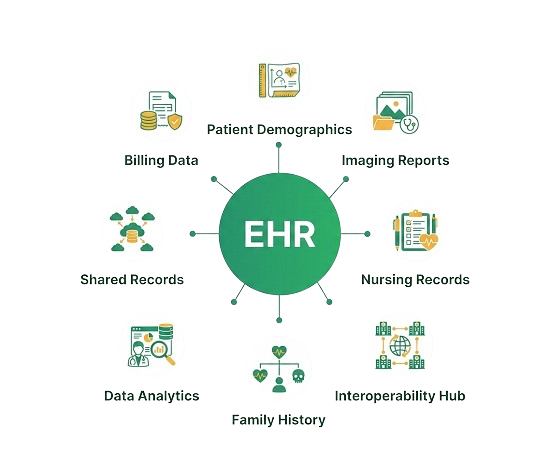
Every visit, prescription and diagnosis stored against the patient — searchable in seconds, not folders.
OPD & Appointment Scheduling
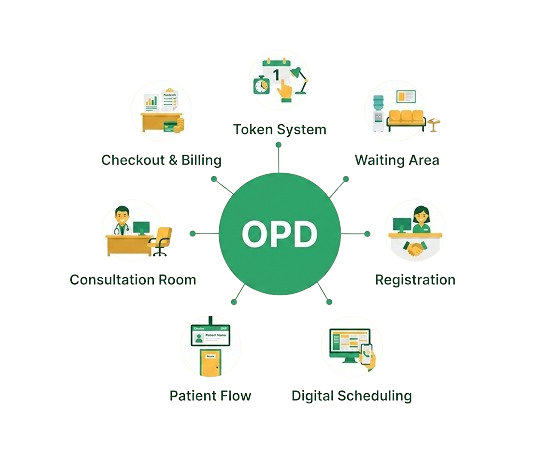
Slot bookings, walk‑ins and follow‑ups on one calendar, visible to every doctor on duty.
Token & Queue Management
Patients get a token at check‑in; the waiting‑room display updates itself as each visit is called.
Billing & Invoicing
Bills are generated at checkout and the day's collections reconcile themselves automatically.
Pharmacy & Inventory
Stock drops the moment a prescription is dispensed — no manual counting at closing time.
Lab & Diagnostics
Send test orders out and pull results straight back into the patient's record.
Reports & Analytics
Footfall, revenue and doctor‑wise load — ready without exporting a single spreadsheet.
Multi‑branch Access
One login for every branch, with role‑based access for staff, doctors and admins.
A patient's visit, start to finish
Five steps. One continuous record.
This is the actual order a visit moves through MyOPDApp — each step hands data to the next, automatically.
01
Check‑in
Front desk registers a new patient or pulls up their existing record in seconds.
02
Token issued & EHR
A queue number is generated and health information from multiple doctors.
03
Consultation
The doctor opens the patient's full history and writes the prescription inside MyOPDApp.
04
Billing
Charges from the visit move to billing automatically; the patient pays at checkout.
05
Record updated (EMR)
Diagnosis, prescription and the next follow‑up date are saved to the patient's file.
Before you ask
Frequently asked questions
Can't find what you're looking for? Reach out and our team will walk you through it.
Patient data is encrypted, access is role‑based so staff only see what their role needs, and records are backed up on a regular schedule. We can walk through your clinic's specific data‑handling requirements on a call.
Yes. Every doctor, front‑desk staff member and branch admin gets their own login with permissions matched to their role, and owners can view every branch from one dashboard.
No. MyOPDApp runs on the computers, tablets and printers you already have. A token printer or a waiting‑room display screen helps but isn't required to get started.
Most single‑branch clinics are live within a week. Our team helps configure your doctors, departments and billing items, and assists with moving over existing patient records.
Yes — bring records as a spreadsheet or export from your current system, and our onboarding team will help map and import them ahead of go‑live.
Short connectivity drops shouldn't stop your front desk — entries made during a drop sync automatically once the connection is back, so nothing needs to be re‑entered.
Every clinic gets onboarding training for staff and doctors, plus ongoing support by phone, email and chat once you're live.
Pricing depends on the number of doctors, branches and modules you need. Book a free demo and we'll put together a plan sized to your clinic.
Get in touch
Let's set up your clinic on MyOPDApp
Tell us a little about your clinic and we'll set up a walkthrough at a time that works for you.
-
Visit us 2nd FLOOR, Ranjan Plaza, 207, Kangkar Bagh Road, near Axis Bank, Patna, Bihar 800020
-
Call us +917488879710
-
Email us info@rtspvtltd.com
-
Office hours Mon – Sat, 9:00 AM – 7:00 PM IST
We're online now
Ready to see MyOPDApp running in your clinic?
Book a free walkthrough — we'll show OPD, EMR and token management set up around your own clinic's workflow.
Book a free demo